Is local AI private? A letter to an owner who was told it is
Local AI keeps the model on hardware you control. It doesn't keep guest lists or passwords private on its own. Here is what to ask before you sign.
On this page
To the owner who has just been told that local AI fixes the data problem,
Picture a family hotel group in Kerala, with four properties and 260 staff. The second-generation owner has watched front-desk and sales people paste guest emails into a public chatbot for a year. A consultant visits and says the fix is simple: run the model locally so nothing leaves the building. The owner nods because the line sounds right, but when the two-page quote arrives there's no way to tell whether it buys safety or just a server. Nobody in the room can read it.
This letter is for that owner. It's also for you if you sit in Dubai or Doha and have heard the same sentence from a vendor. I think the sentence is half true. The missing half is where your guests' passport scans end up.
Local covers one floor of five
Local means the model runs on a machine you own or rent exclusively, so your questions never reach a model company's servers. That's a real gain. It answers one question about your data.
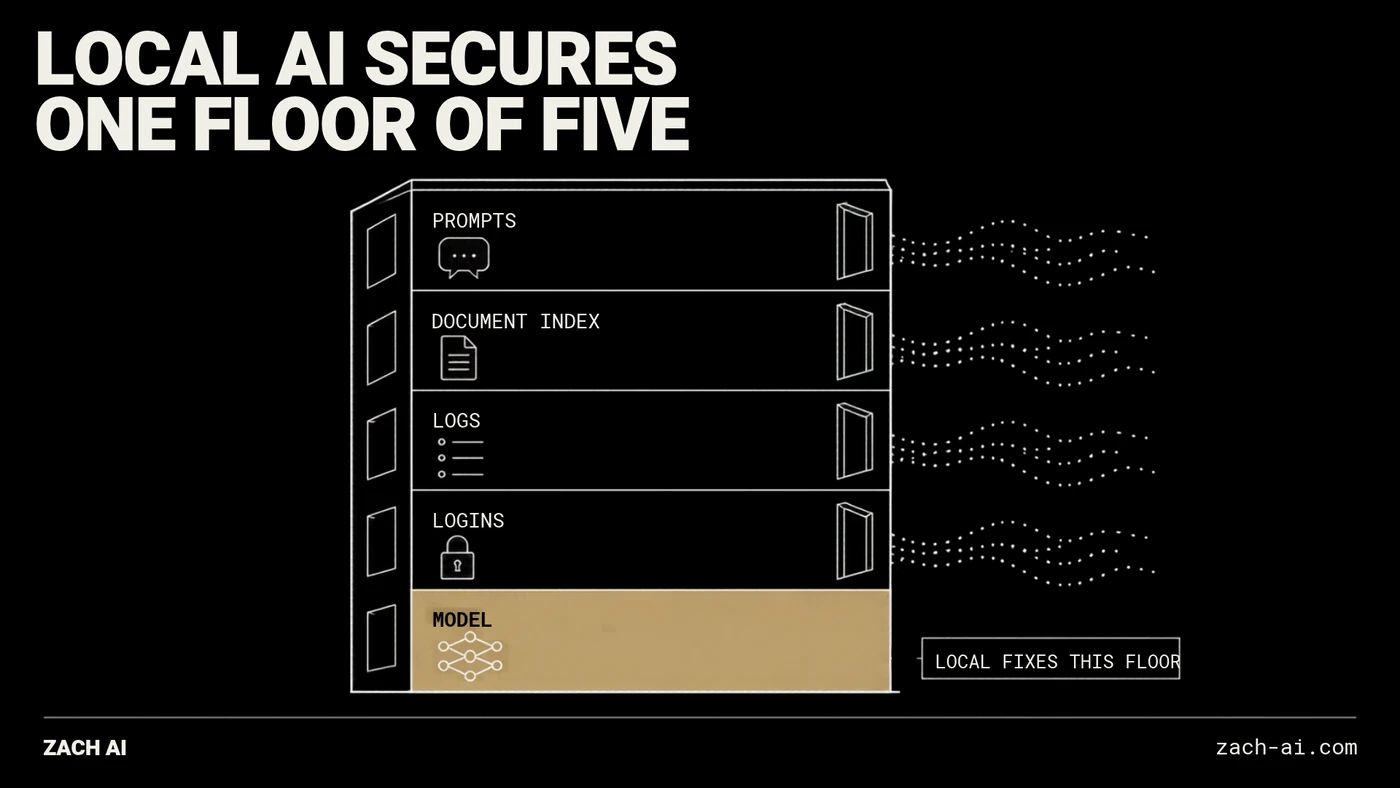
An AI system that reads your documents keeps your data in five places. Start at the top with the prompt, which is whatever a person types or pastes plus the route it takes to the model. Below that sits the document index: to answer questions about your contracts, the system builds a searchable copy of them, and that copy is exactly as sensitive as the contracts. Then come the logs, because many systems save every question and answer for debugging, and a log of questions maps what worries your management. Next are the sign-in credentials, which covers who can log in and what the system can log in to on someone's behalf. At the bottom is the model itself, and the questions of where it runs and whether your data trains it.
A local model secures only that bottom floor. If the index sits unencrypted on a laptop and the logs flow to a vendor's dashboard, your data has left through the side door while everyone admired the front one.
Staff are already using the other four
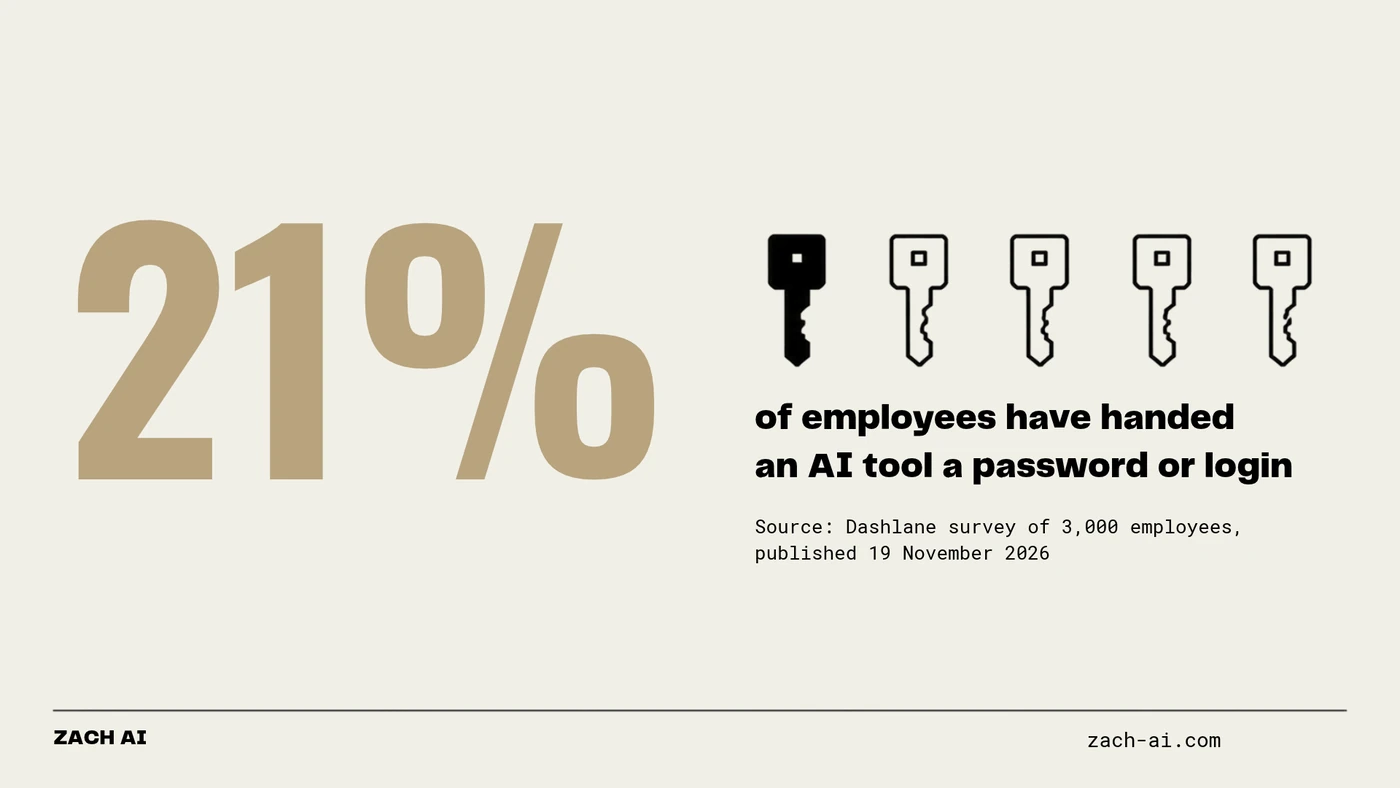
Look at credentials first, since owners forget that floor. On 19 November, Dashlane published a survey of 3,000 employees and 800 IT and security leaders across the US and two European countries. Dashlane reports that 21% of employees have shared a password or login with an AI tool or agent. About 1 in 5 had given AI access it should not have had, and nearly half of those say the access is still active. Most likely they wanted a task finished, not a breach, but the exposure is the same.
PagerDuty's June survey of 1,250 office professionals at firms with $500 million or more in revenue found the same habit on the prompt floor. 88% had shared work information with public AI tools, and 34% had entered customer data. Those firms have security teams, but an owner-led group with 260 staff and one IT person has fewer guards.
Neither survey covers the Gulf, so I wouldn't claim it predicts your staff. It does show the habit is common, which is reason enough to assume it until you've checked.
Local builds make this worse in one way. A model in your own office feels like a closed room, and that feeling is the risk because staff relax. They paste the full contract and the guest list because the vendor said nothing leaves. If the index is readable by every login, a housekeeping supervisor's account can ask the system about the owner's loan terms. Access has to follow the person, and someone has to decide that before launch, because nobody will find it as a setting later.
The law changes what you must prove
The UAE's federal data protection law, Decree-Law 45 of 2021, restricts moving personal data out of the country, and health data has its own stricter rule. One buyer's guide to private LLMs in the UAE sets out the details, including a fine of AED 500,000 to 700,000 for breaching the health-data transfer article. The same guide warns that running AI on premise is a technical control and won't make a company compliant by itself. I agree with that, and your own lawyer should confirm which rules bind you.
For a hotel group, guest ID scans are personal data. A model hosted abroad that receives them in a prompt is a transfer you'd have to justify, and that's a lot of exposure for one pasted scan. A model inside your own environment removes that question for the model floor, but it says nothing about the index or the logs.
Cloud is sometimes the better call
Local shouldn't be sold as a religion, because a small model that runs on modest hardware is usually weaker than the best cloud models at long documents, and it often struggles when Arabic and English share one thread. If the task is drafting a reply to a review that holds no guest details, a cloud model under a sensible business contract may be the right tool, and a local one is an expensive way to get a worse answer.
A sound design splits the work, which is why guest identity and payroll stay on your side of the line while generic drafting can go out. Somebody has to decide which is which. Write it where the builder can see it.
Testing a builder who says "private"
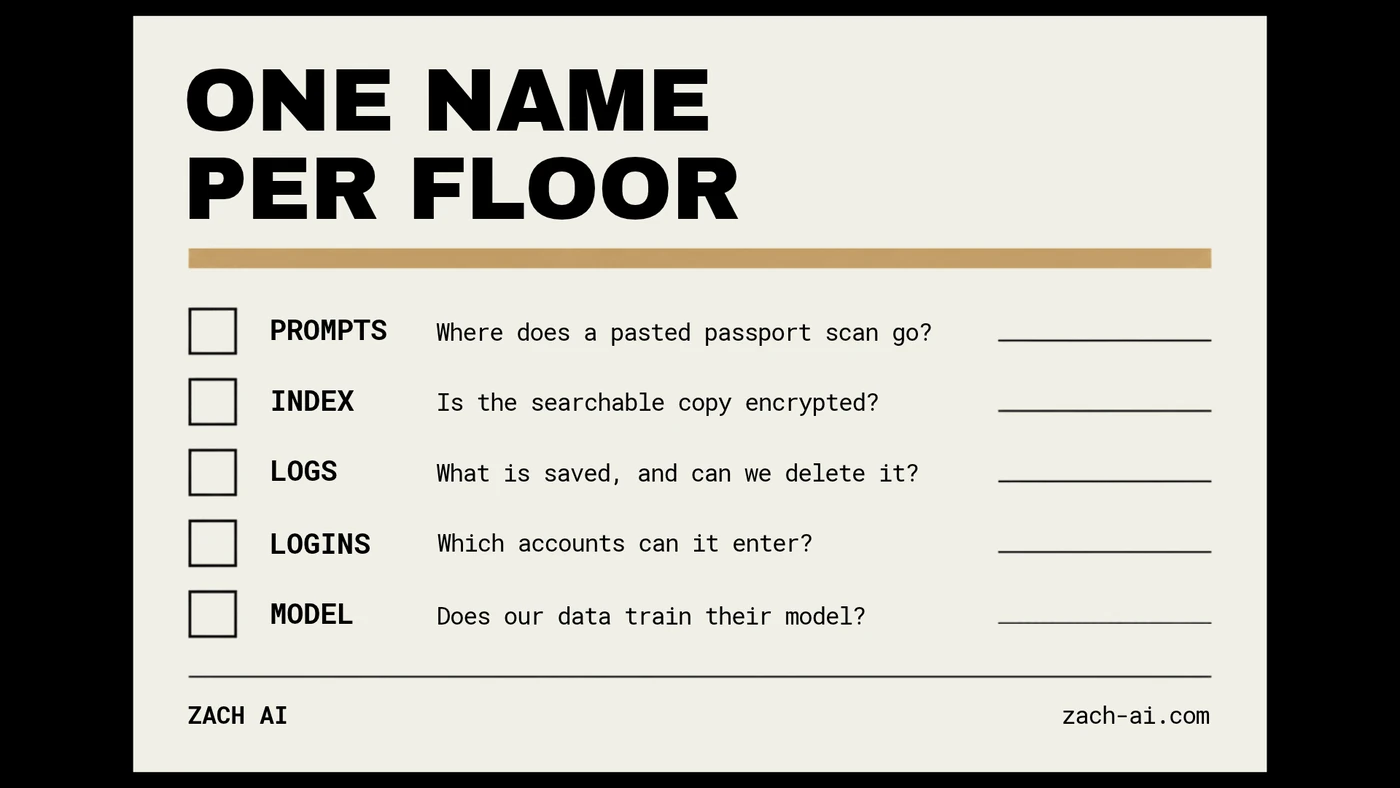
Ask for a one-page map of the five floors showing where the data sits and who can read it. Put a manager's name next to every floor, because a floor with no owner is where leaks start.
Then ask one question per floor, and time each answer. On the prompt floor, ask where a pasted passport scan goes, because that's the case a front desk meets daily. For the index, ask whether the searchable copy of our contracts is encrypted, because that decides who could read it if a laptop is lost. Ask about the logs next: what gets saved from each question, and can we delete it? Logins come after that, since the system should only enter accounts we've named. Finish with the model, and whether anything we send improves a model someone else owns.
A practised builder answers each in one line. One who says "secure" and nothing else hasn't done it.
The Kerala owner's next move
Back to the hotel group. The owner asks for the map, and it comes back a week later with four floors filled in and the logs floor blank, because the first design saved every question to a hosted dashboard. Seeing the blank takes no knowledge of logging. The builder fixes it before a single guest record is loaded.
You can't audit the code yourself, but you can get the person who knows where everything sits to say it out loud. Say it to someone with the authority to say no.
Frequently asked questions
- What does local AI mean for a business?
- It means the model runs on hardware you own or rent exclusively, so your questions stay off a model provider's servers. That protects the model floor. The document copy and the logs need their own protection.
- Is local AI more secure than ChatGPT?
- For the model, yes, because nothing leaves your environment. The total risk depends on the other four places data sits, and a local system with weak logs and shared passwords can leak more than a well-configured business cloud account.
- Does an on-premise AI system make a company compliant with data protection law?
- No. It can make compliance easier to show, because it's a technical control and not a legal status. Which rules apply depends on your country and the data involved, so your lawyer should confirm the obligations.
- Do I need local AI if my staff only draft emails?
- Sometimes. That holds only if the emails contain personal or contract data. For generic drafting, a business cloud account with clear rules may be enough, because the decision follows the data and not the task.
Sources and further reading
Putting the five floors on paper
If you're weighing a custom AI build and want a second pair of eyes on the five-floor map before you commit, our team will go through it with you. Start at zach-ai.com.