Should you ban ChatGPT at work?
A ban moves AI use onto personal accounts you can't see. I'd pay for company accounts and write one page on what never goes in and who approves connecting a tool.
On this page
I wouldn't, because if you run a firm of 30 to 200 people, a ban mostly stops staff from telling you about their AI use while the work carries on from personal phones. I'd do something else. Pay for company accounts on one or two tools, so the work happens somewhere the company controls. Then write one page that names the information that never goes into any AI tool, and says that nobody connects an AI tool to company email or customer records without written approval from a named person. You should write that page yourself, because it decides how much risk the company takes.
On 3 November, DNSFilter published a survey based on June interviews with 400 IT and security managers at North American firms with 150 to 5,000 staff about the unapproved AI tools running inside their companies. 46.1% said an employee had connected an unapproved AI tool to Google Workspace, Microsoft 365 or the company's single sign-on, and one in five said a connection like that had already caused a security incident. Even the smaller firms in that survey employ dedicated IT and security staff, yet they still missed nearly half those connections, so a smaller business with one IT person or an outside provider probably sees even less.
The way companies grant access is worse than the raw tool count. When a new AI tool asks for access to company systems, 36.8% of those companies let the employee grant it and tell IT afterwards, while another 6.5% don't ask to be told at all. So at roughly four companies in ten, the decision to open the company's email or files to an AI tool is made by whoever clicks Allow. DNSFilter's chief executive, Ken Carnesi, said the decision to connect an AI tool to company data is too often made by someone who doesn't own the risk. I agree, and in an owner-led company the person carrying that risk is rarely the one clicking Allow.
Does a ban stop people using AI?
People open AI tools at work because they save time on jobs nobody enjoys, like a tough client email or a forty-page tender summary. A memo that says "don't" gives none of that time back, so nobody drops a useful habit just because HR sent a policy to their inbox. Instead, I'd expect the use to move onto a phone or a home laptop, leaving you without even the slim chance of hearing about it.
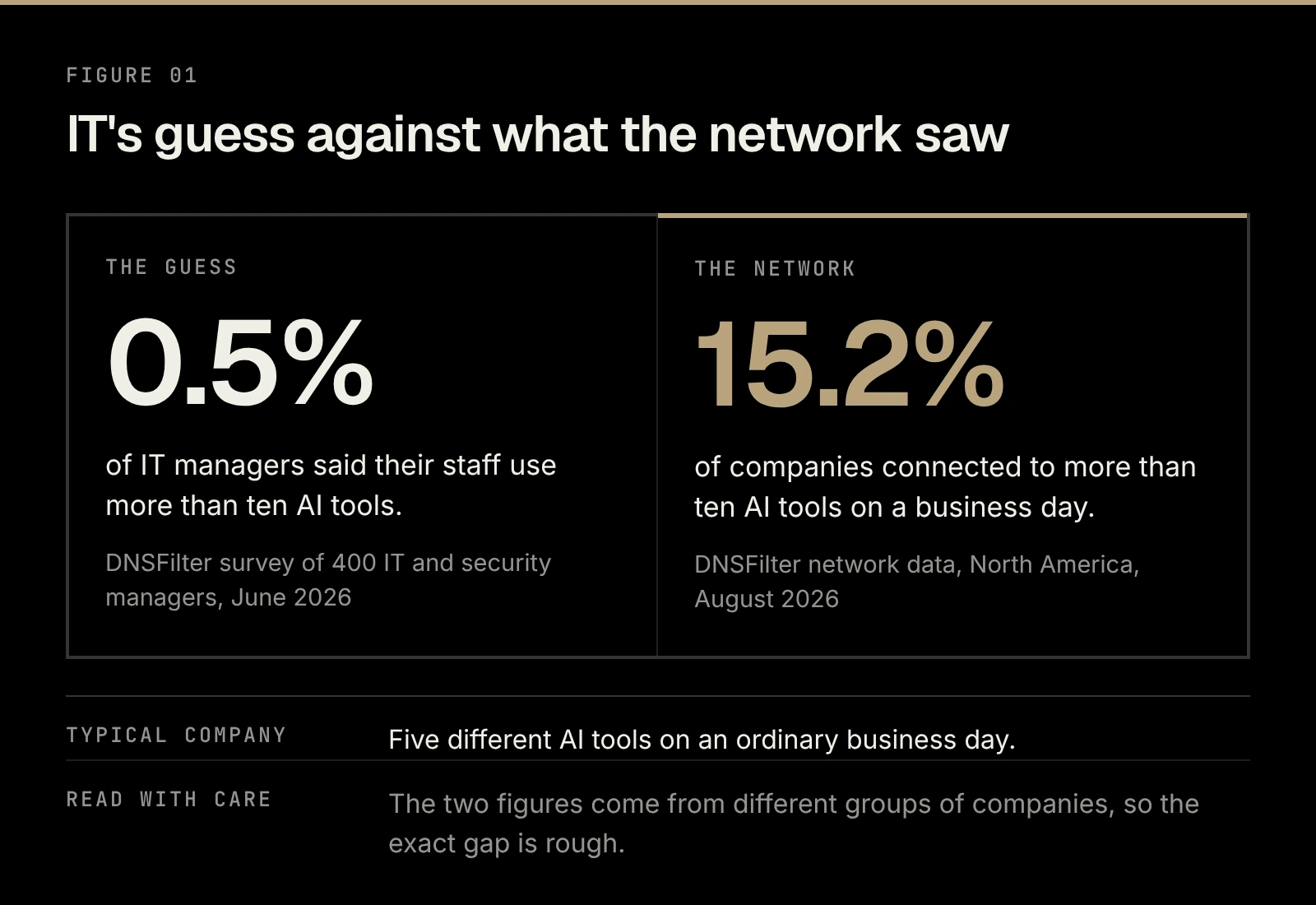
DNSFilter's own network data shows how far off internal guesses already are. In August the typical company on its network connected to five AI tools on an ordinary business day, while 15.2% connected to more than ten, even though only 0.5% of the surveyed IT managers guessed their staff crossed ten. The two numbers come from different groups of companies, so I wouldn't lean on the exact gap. But these are the people paid to watch the network, and if their guesses sit that low, I wouldn't trust my own estimate as an owner either.
If your staff have already spent a year using personal logins at work, some client material is already sitting inside chat histories the company doesn't own, and a ban won't pull it back.
Does company data stay yours on a personal account?
The first difference is model training, since OpenAI's help page explains that individual accounts including the free tier may train models on your chats unless the user switches that off in settings. By default it doesn't train on data from ChatGPT Business or Enterprise workspaces. I'd read the same page for any tool you approve, because the terms differ by vendor and by plan.
But the second difference is the one I care about more, and it's ownership. Free logins stay with the user. When they leave, your proposal drafts go with them, and nothing in that free login gives you a way to pull them back. In a company workspace you add people and remove them, so their access ends when their job does.
At Zach AI, we keep work files inside shared accounts the company owns for that exact reason. Nothing belongs in an employee's personal login where it walks out the door when roles change, but teams rarely set that boundary early. What your team builds with these tools is company knowledge, so it should stay with the business.
The page I'd write
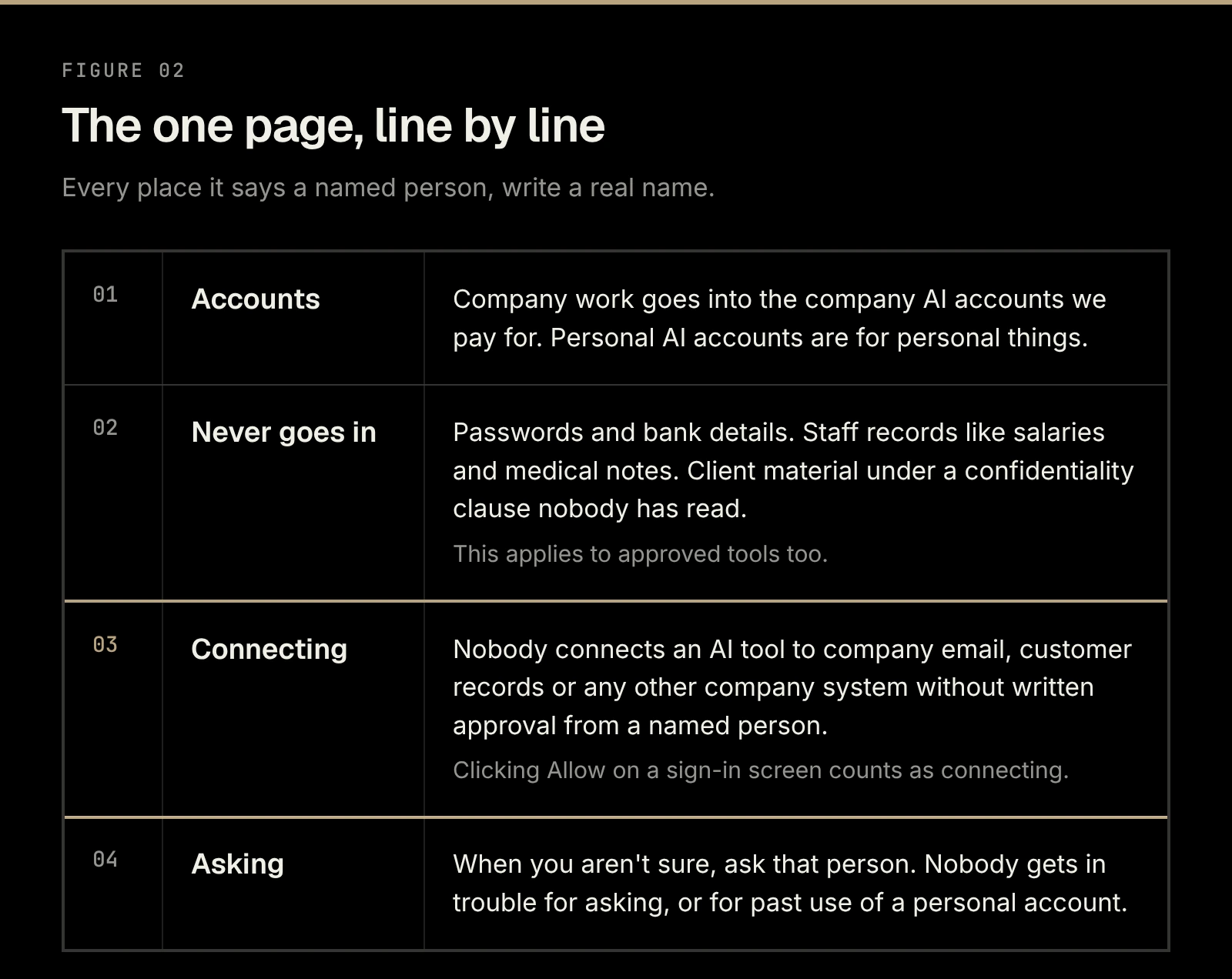
Keep it to one page so people read it, and put a real name wherever it calls for an approver.
Line one puts company work inside company-paid AI accounts, leaving personal logins for personal use.
Next comes the information that never goes into any AI tool, even an approved one. Passwords and bank details are the obvious part, because anyone who reads them can use them. Staff records like salaries and medical notes go on it too, since your people never agreed to share them. Anything a client gave us under a confidentiality clause stays out as well until someone has checked what the clause allows.
Third, nobody connects an AI tool to company email or customer records, or any other company system, without written approval from a named person. Clicking Allow counts, but people forget that.
And the last line tells people to ask that person when they aren't sure. Nobody gets in trouble for asking, or for telling us they've used a personal account until now.
The third line is where the DNSFilter numbers sit, and it's the one I'd expect owners to skip. Connecting a tool is a bigger step than typing into one, because once a tool can reach a mailbox it can usually read far more than anyone would paste in by hand. I wrote about what an agent should be allowed to do once it's connected in an earlier piece. This page comes one step before that, and decides who gets to connect anything at all.
I put the last line there because of the ban problem. If people expect to be punished for past use, they'll keep quiet about it, and you'll still be guessing. If your sales team has been drafting quotes in personal accounts for six months, I'd want to hear it this week and move that work into a company account, and an amnesty is the cheapest way to hear it.
Ownership of the risk call
Your IT person or provider should set up the accounts, and they can tell you which tools are already asking for access. But the never list and the choice of who approves a connection are calls about risk, and in a 30 to 200 person company those belong to the owner or a senior partner. Nobody in IT can make them for you.
Budget signers also seem furthest from the leak in DNSFilter's survey. Asked whether their company was running up AI costs that its usual tracking couldn't see, 58.8% of IT managers said they were concerned, compared with 43.5% of executive leaders, the lowest of any group asked. I read that gap as distance from daily tool use more than calm about the bill.
Isn't a company account one more subscription?
It is one more line item, yet paying for it beats leaving staff on personal accounts where the company owns nothing. Pick one or two tools your team already opens. Nobody wants extra software to learn. Two paid workspaces beat five unapproved tools.
The other objection is "I'm not technical." Writing the page takes no technical background either, because every question on it is a business call about what your firm cannot afford to have leave the building and who you trust to approve a system connection, and you know both answers better than any vendor.
Starting this week
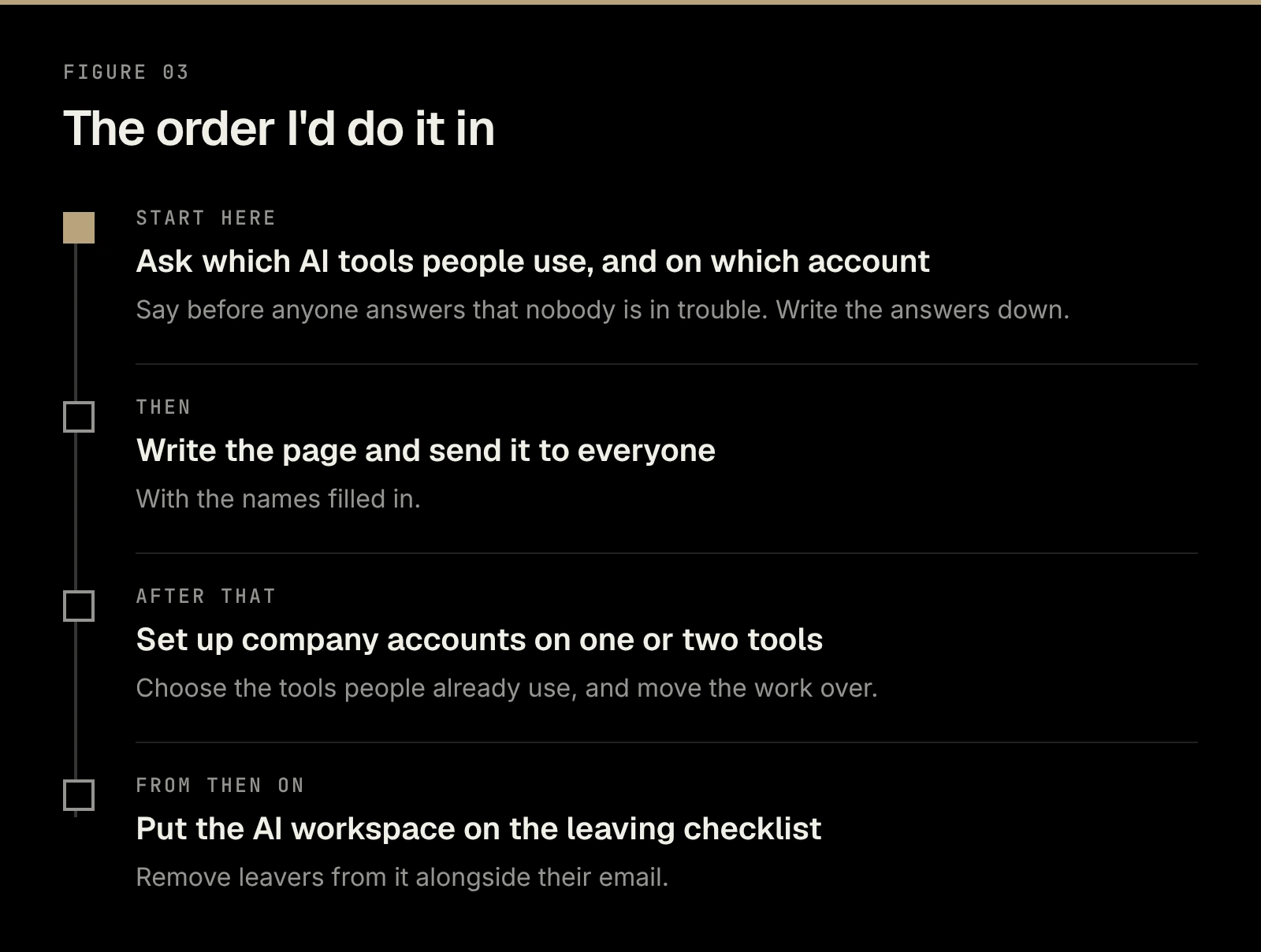
Ask your team which AI tools they use at work and under which login, promising upfront that nobody is in trouble. Log every answer. Then write the page, with the names filled in, and send it to everyone. After that, set up company accounts on one or two of the tools people already use and move the work over. Removing someone from the AI workspace goes on the same leaving checklist as their email, from the first day.
Working through this with our team
Writing a rule like this gets much easier once you use these tools across your own work instead of governing them from a distance. Inside Private AI Capability, we spend six weeks working one-to-one on your own files inside PRAXIS, starting from a pre-week baseline and closing with a test on unseen tasks, where you can book a 30-minute conversation.
FAQ
- Is it safe to put company data into ChatGPT?
- It depends on the account and on the data. On OpenAI's plans for individuals your conversations may be used for training unless you switch that off. Data in a ChatGPT Business or Enterprise workspace isn't used for training by default. But some information shouldn't go into any AI tool on any plan. Passwords and bank details are the plain examples, and so is client material under a confidentiality clause nobody has checked.
- Should a company ban ChatGPT?
- I wouldn't, because a ban tends to push the use onto personal accounts you can't see. Pay for company accounts on one or two tools, and write one page saying what never goes in and who approves connecting a tool to company systems.
- Does ChatGPT train on my company's data?
- OpenAI says it doesn't train on data from ChatGPT Business or Enterprise workspaces by default. On its plans for individuals it may, unless the user turns the setting off. So if your staff use personal accounts for work, that choice is theirs to make, and you won't know which way they made it.
- Which rules belong in an AI policy for employees?
- I'd start with which accounts company work goes into and which information never goes into any AI tool. Then name the person who approves connecting an AI tool to company systems, and say that people can ask that person when they're unsure, with no trouble for past use.